可以使用jQuery 遍历中的 not() 方法来排除某些元素,例如根据元素的id,class等排除,示例代码
|
1
|
$("div.content *").not(".keep"); // 表示content类的div下除keep类以外的所有元素;另外,注意*表示所有元素 |
下面给出实例演示:删除content类的div下除keep类以外的所有元素
1、创建Html元素
|
1
2
3
4
5
6
7
8
9
10
11
12
13
|
<div class="box"> <span>点击按钮删除下面绿色框中所有不是keep类的元素,keep类的元素用红色区分。</span> <div class="content"> <input type="checkbox" name="item"><span>萝卜</span> <input type="checkbox" name="item"><span>青菜</span> <input type="checkbox" name="item" class="keep"><span class="keep">小葱</span> <input type="checkbox" name="item" class="keep"><span class="keep">豆腐</span> <input type="checkbox" name="item"><span>土豆</span> <input type="checkbox" name="item"><span>茄子</span> <input type="text" value="我也不是keep类的"> </div> <input type="button" value="删除"></div> |
2、设置css样式
|
1
2
3
4
5
6
|
div.box{width:300px;height:200px;padding:10px 20px;border:4px dashed #ccc;}div.box>span{color:#999;font-style:italic;}.keep{color:red;}div.content{width:250px;height:100px;margin:10px 0;border:1px solid green;}input{margin:10px;}input[type='button']{width:200px;height:35px;margin:10px;border:2px solid #ebbcbe;} |
3、编写jquery代码
|
1
2
3
4
5
6
7
|
$(function(){ $("input:button").click(function() { $("div.content *").not(".keep").each(function() { // "*"表示div.content下的所有元素 $(this).remove(); }); });}) |
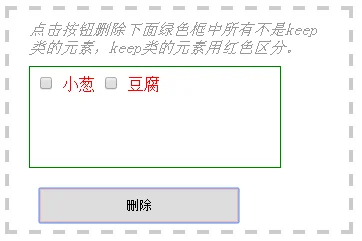
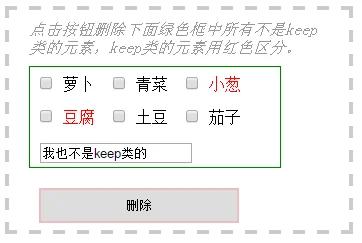
4、观察显示效果
删除前
删除后